> For the complete documentation index, see [llms.txt](https://blog.p1k4chu.com/llms.txt). Markdown versions of documentation pages are available by appending `.md` to page URLs; this page is available as [Markdown](https://blog.p1k4chu.com/security-research/cloud-security-research/using-azure-open-ai-these-3-free-changes-can-surprisingly-make-your-setup-secure.md).
# Using Azure Open AI? These 3 free changes can surprisingly make your setup secure
No extra budget, no extra tools — just five settings standing between you and a hardened Microsoft Foundry setup
> The views expressed in this blog are solely mine and doesn’t reflect the opinions of my employer and any recommendation mentioned in this blog shouldn’t be taken as an official guidance. The recommendations are a result of my personal usage of the product alone.
>
> Finally, this isn’t an AI slop blog post and written by an actual human. Feel free to hit me up with any feedback — critical or otherwise: [LinkedIn](https://in.linkedin.con/in/pbssubhash)
Microsoft offers Open AI and other models through their hosted AI services with their partnership with Open AI, Anthropic and other AI companies through Microsoft Foundry. Learn more about Microsoft Foundry and Azure Open AI [here](https://azure.microsoft.com/en-us/products/ai-foundry).
[Alaska Airlines](https://www.microsoft.com/en/customers/story/25850-alaska-airlines-azure-openai), [Bayer](https://www.microsoft.com/en/customers/story/25255-bayer-azure-phi), [Air India](https://www.microsoft.com/en/customers/story/26047-air-india-azure-openai-in-foundry-models), [Bank of New York](https://www.microsoft.com/en/customers/story/27291-bny-azure-openai-in-foundry-models) are some of the big names that are currently using Azure Open AI service in their respective businesses. If you’re interested in how these big tech firms are using Microsoft Foundry, check [this out](https://www.microsoft.com/en-us/customers/search?q=Azure+Foundry).
While setting up AI infra on Azure doesn’t fall in the scope of this blog, if you are interested, drop a note/comment, I have something planned to come out soon.
### Azure Open AI v/s Microsoft Foundry
Before we get started, it’s important to know the distinction between Azure Open AI and Microsoft Foundry as a few security features differ for both. While I will mention if a security feature or fix, please note the distinction.
Azure Open AI was an initial service offering. While officially this isn’t deprecated, I’d personally suggest moving to Microsoft Foundry due to the feature set it offers.
The key difference between both of them is that Azure Open AI endpoints offers Open AI models alone and offers a simple setup while Microsoft foundry offers a very complicated setup and allows for using of models from (and hosted by) other companies like Anthropic.
### #1. Create guardrails for your model/agent
***Threat:*** A backdoored model or a malicious MCP server might communicate with external attacker controlled servers to download additional payload or exfiltrate data to a threat actor controlled server. Enabling this would
***Security Control:*** A Guardrail can be used for following (a non exhaustive list) -
* Monitor/Block network requests to illicit domains or explicitly allow communication to a subset of domains
* Prevent hate speech or PII from being sent in the output
* Prevent Jailbreaking and Prompt injection
* Block input/output with custom keywords by creating a blocklist
Press enter or click to view image in full size
Creating a sample guardrails only to allow egress network traffic to microsoft.com
### #2. Enabling logging of Request, Responses & Agentic traces
***Threat***: Your agentic interface is compromised or you suspect that your model is backdoored or you’ve been a victim of a malicious MCP performing a rug pull attack. For identifying root cause and for that matter, even for detecting an attack in the first place, logging needs to be present. And if you end up using an agent for controlling your Foundry resource, these logs help.
***Security*** ***Control***: Leveraging the native Azure’s Diagnostic setting feature and the Agent trace logging feature, you will be able to log all the request/response and agent actions.
To know about the schema of the logs associated with these, please take a look at the documentation [here](https://learn.microsoft.com/en-us/azure/foundry/openai/monitor-openai-reference#resource-logs).
To enable Logging of Request/Responses, head over to the Microsoft Foundry resource or the Azure Open AI endpoint resource > Monitoring > Diagnostic Settings and add the logs that you wish to forward and the desired destination.
Press enter or click to view image in full size
Enabling Diagnostic Settings
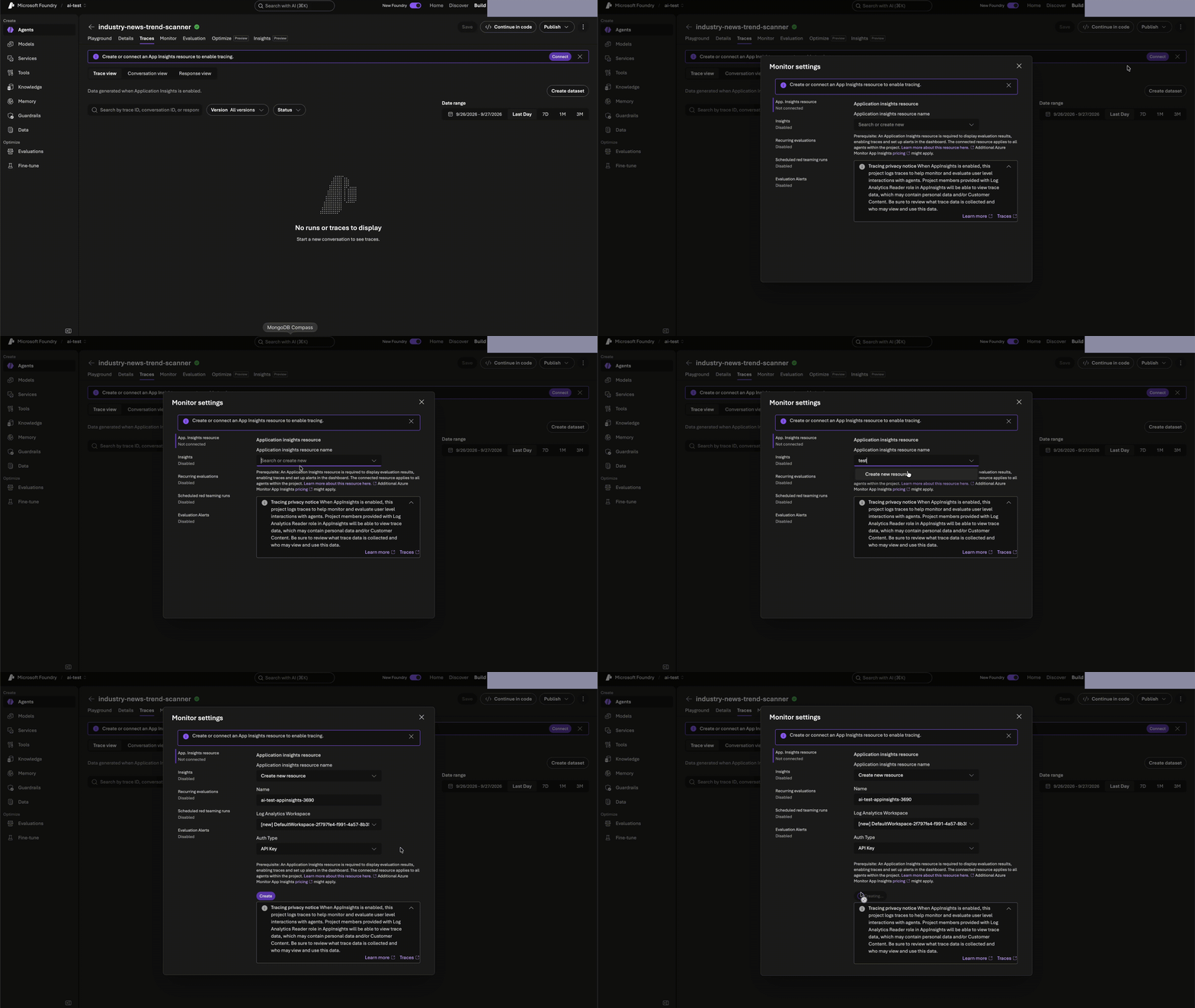
To enable agent traces, go to the agent for which logging is to be enabled > Traces > Connect to a new/existing App analytics workspace
Press enter or click to view image in full size
Enable Agent Traces
### #3. Enable subscription or resource level policy
***Threat:*** An employee with required priviliges might create a vulnerable agent and/or with a malicious MCP server and might not attach any guardrails to prevent appropriate content aligning with your organizational policies.
***Security Control:*** Microsoft Foundry allows for creation of policies that can apply to all resources within a Resource Group or Subscription. This allows for blanket protection irrespective or presence of guardrails for individual models. By default, Microsoft Foundry enables
1. Click on *Control* on the top right corner inside [Azure Foundry portal](https://ai.azure.com/).
2. Select *Compliance* > *Create a policy*
3. Risk is the actual rule that got triggered. For e.g. this policy rule get triggered when someone sends a jailbreak prompt in input. You can select multiple risks
4. Select the subscription or resource group that it should apply to. All the resources inside the subscription/resource group will be have these rules applied.
Press enter or click to view image in full size
Creating a policy
That’s all for this blog. If you like what you see or you have some critical feedback, please do share it with me directly or drop a comment 😁